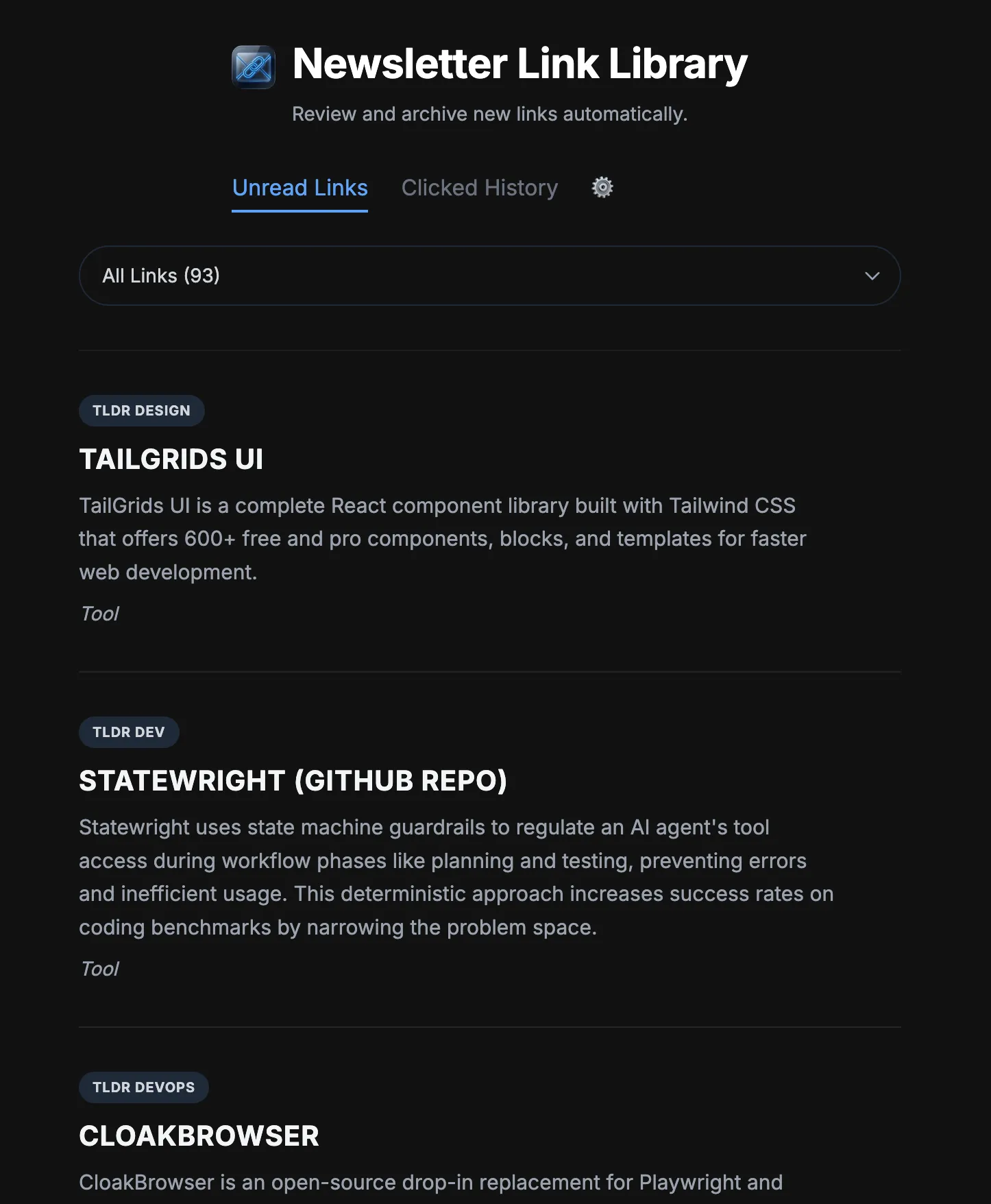
I built a little vibe coded newsletter analyser application that I’m super proud of. I’m not proud of it being vibe coded, but I am proud of the ideas that I’ve had the AI build into it.
I subscribe to a lot of tech and web development newsletters (think TLDR, React Weekly, This Week in React and similar link-aggregators). Processing them every day can be a chore — some are incredibly noisy, cluttered with sponsored ads, and often contain duplicate links. This app makes my processing much more efficient, and will eventually be able to highlight links that I’m likely to be interested in.
The Architecture
The app has been built using Gmail labels, Google AntiGravity, Google Apps Script, Gemini and Val Town. I instructed the AI to use React, and it chose to use Tailwind (unsurprisingly).
AntiGravity is where I’m doing my vibe coding. I wanted to test the new IDE out, and this app was perfectly small and insignificant enough to be able to do that.
Google Apps Script makes ingesting emails incredibly easy. I have a timed script that will run once per hour, grabbing the latest label: Newsletters email from my inbox. The script then sends the plain email body off to a ValTown script to be processed.
Processing in the ValTown script starts by sending that plain email body to Gemini with a prompt to extract all of the links within it, filtering out any sponsor links, and also trimming off link tracking information.
To get around a constant issue with Gemini returning an error due to high server loads, I had an AI model fallback pattern implemented, whereby the next model in a list will be tried if one before it fails. If all models in a list fail, the script gives up, and the email being processed is left in the inbox to be processed the next time the script runs. This pattern is implemented in the Apps Script, as I anticipated ValTown would time out before a second call to an LLM would actually complete.
N.b. In terms of high server loads, I’m certainly not contributing, in any significant amount, to that. My script runs once an hour and only sends 1 email in that run.
Anyway, when Gemini does send a result, it will be a JSON structure with all of the extracted links from the newsletter: Title, description, URL, and category. In the prompt to Gemini, I ask it to categorise a link as either “Tool” or “Article” — essentially guessing whether it’s something I’m going to read or something I’m going to use. In hindsight, I haven’t found this particularly useful. The ValTown script takes the Gemini response and then uses a SQLite UNIQUE constraint on the URL to store it. This is how I avoid storing the same link multiple times; since newsletter emails are all from different sources, they often have overlapping articles or tools that are “hot right now,” and I don’t need to review the exact same link more than once.
The UI
The UI took a few iterations, but I landed on a single-column, 600px reading width layout. It is designed for rapid triage, using a few performance and behavioural tricks to remove friction.
SSR + Background Pre-fetching
The initial page load renders 20 links server-side. The moment it loads, a client-side script pre-fetches the next 20 in the background. Clicking “Load Next Page” swaps them in instantly with zero network lag.
Implicit Analytics
When I click a link, a background post request tags it as clicked = 1. This is building a clean training dataset so I can eventually build a custom ranking model tailored to my actual reading habits.
Mobile & Interaction Polish
Since I often triage these on my phone, the mobile experience had to feel like a native application.
PWA Support
It has a complete manifest and caching setup, allowing me to install it as a standalone app.
Thumb-friendly Targets
All touch targets are strictly set to 44px or larger.
Dual Synced Dropdowns
There’s a newsletter filter dropdown at the top, and a synced duplicate at the bottom of the feed. The bottom one appears when finishing a page of links, meaning I don’t have to reach my thumb all the way to the top of the screen to switch to the next source.
The Weekly Recap Loop
I wanted a way to save articles to read in-depth during the weekend, rather than interrupting my rapid triage flow.
Swipe-to-Save
Mobile uses a swipe gesture to save links to a “recap” list. Desktop uses a simple hover button.
Weekly Email Digest
A Val Town cron runs every Sunday morning. It compiles all saved links, groups them by my custom newsletter priority order, and emails them to me as a clean, styled HTML digest.
Explicit Idempotency
The cron updates a recap_sent_at column in SQLite after a successful send, guaranteeing that a failed run or rerun won’t spam me with duplicate emails.
Wrap up
I’ve enjoyed working on this app. It’s not taken too long - it’s all been vibe coded after all, and I’m still uneasy about not really having much of an idea of what the code does, but the app works, it does what I told the AI to make it do, so I guess that’s good enough.. At least for this little application that is solely built for one person, me.